Google Autocomplete Keyword Research: The Complete Guide
Everything you need to turn Google's search predictions into a clean, organized long-tail keyword list, and the limits you should know about.
Start typing into Google and a list of predictions drops down before you finish the word. For keyword researchers, that dropdown is one of the most useful free data sources there is: it shows phrases real people search for, in their own words, including long-tail queries that paid tools often miss.
This guide explains how Google Autocomplete works, the research methods that get the most out of it, how to turn hundreds of predictions into a usable keyword plan, and where autocomplete data stops being reliable.
What Google Autocomplete actually shows you
Google describes its predictions plainly: once you start typing, autocomplete predictions reflect real searches that have been done on Google. To choose which ones to show, its systems also look at the language of the query, where the query is coming from, trending interest, and, for signed-in users, your own past searches.
Two details matter for research:
- Predictions are not a popularity ranking. Google says autocomplete doesn't simply display the most common queries on a topic, which is why it differs from Google Trends and shouldn't be compared against it.
- Some predictions are removed. Automated systems and enforcement teams filter out predictions that break Google's policies, such as violent, hateful or sexually explicit ones. Absence from the dropdown is not proof nobody searches a phrase.
So treat autocomplete as a map of real phrasing and real demand, not as a search-volume tool. It tells you what people search and how they say it. A metrics tool tells you how many.
Why autocomplete is so good for long-tail keywords
Long-tail keywords are longer, more specific searches like mobile car detailing near me within 5 mi instead of car detailing. They usually have less competition and clearer intent, which makes them the easiest wins for new and niche sites.
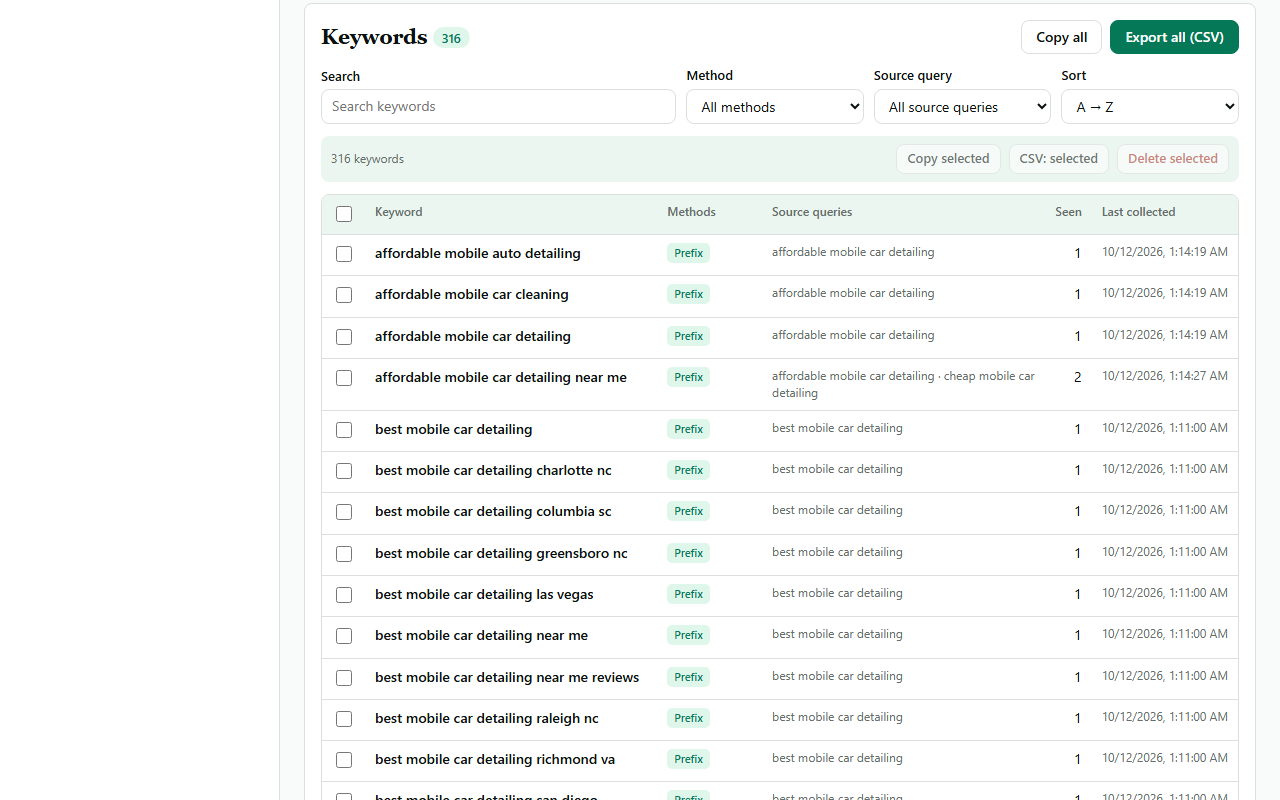
Autocomplete is built for exactly this. Every prediction is a longer version of what you typed, so each query you enter fans out into several longer phrases. In our own case study for "mobile car detailing", 33 queries produced 316 unique keywords, averaging 4.9 words each, and 200 of them were five words or longer.
The three core research methods
Typing your seed keyword once only shows the top handful of predictions. To see the rest, you change the query systematically so Google has to complete it differently each time.
1. A to Z (the alphabet method)
Add each letter of the alphabet after your seed: mobile car detailing a, mobile car detailing b, and so on to z. Each letter forces a different set of completions. It's the fastest way to see the breadth of a topic, and it surfaces modifiers you wouldn't think to try, like quote, kit or mold removal. Read the full A to Z keyword research guide.
2. Prefix research
Put a word before the seed: best mobile car detailing, cheap mobile car detailing. Prefixes are where commercial intent lives: comparisons, budgets and quality signals.
3. Suffix research
Put a word after the seed: mobile car detailing cost, mobile car detailing near me, mobile car detailing services. Suffixes reveal pricing, local and service-specific searches. Both methods are covered in depth in prefix and suffix keyword research.
Tip: combine methods. A to Z shows you the shape of the niche; prefixes and suffixes then dig into the commercial and local corners A to Z only hinted at.
How to run autocomplete research step by step
- Pick one clear seed. Two to four words that describe the topic, like mobile car detailing. Very broad seeds (cars) return generic predictions; very narrow ones return few.
- Set your market. Predictions change with location and language. Research on the Google domain and language your audience uses, and remember that personalization can tint what you see when you're signed in.
- Run A to Z first. Note which themes keep appearing: cities, prices, equipment, jobs, reviews.
- Turn those themes into prefixes and suffixes. If "cost" keeps showing up, run cost, prices and quote as suffixes.
- Record every suggestion with the query that produced it. The source query tells you the context later, and it shows which keywords appear across several queries, a sign of a strong theme.
- Deduplicate. The same phrase often comes back from different queries. Merge them, ignoring case and extra spaces.
Doing this by hand means typing dozens of queries and copying every prediction. That's the job NicheSpark automates: it enters each query in Google, waits for the dropdown to settle, saves the suggestions with their source query, and merges duplicates. It runs one query at a time with a pause between them, and stops if Google shows a verification page.
From a raw list to a keyword plan
A few hundred keywords is not a content plan yet. Three steps turn it into one:
Group by topic and intent
Cluster keywords that would be answered by the same page. In a local-services niche you'll typically see groups like pricing, near me / local, city pages, starting a business and specific services. Each group becomes one page.
Avoid keyword cannibalization
If two pages target the same group, they compete with each other and both can suffer. One group, one page. Variations like prices and cost usually belong on the same page.
Match the page type to the intent
- Informational ("how much does mobile car detailing cost"): a guide or blog post.
- Commercial ("best mobile car detailing near me"): a comparison or service page.
- Local ("mobile car detailing raleigh nc"): a location page, if you genuinely serve that area.
What autocomplete can't tell you
Being clear about the limits keeps your decisions sound:
- No search volume or difficulty. Autocomplete shows that people search a phrase, not how many do. Check promising keywords in a metrics tool before investing heavily.
- Results vary. Location, language, sign-in state and trends all change predictions. Your list is a snapshot of what Google showed you, at that moment.
- Filtered topics. Policy removals mean some real searches never appear.
- Brand and place noise. Expect business names and distant cities. Filter them out unless they're relevant to you.
Frequently asked questions
Is Google Autocomplete data accurate?
The predictions are based on real searches, so the phrasing is genuine. What it doesn't give you is volume, and what you see is shaped by location, language and personalization.
How many queries should I run?
A full A to Z pass is 26 queries. Add 5 to 10 prefixes and suffixes based on the themes you find. That's usually enough to map a niche; you can always go deeper on a strong theme later.
Can I use autocomplete for any country?
Yes. Research on the local Google domain and in the audience's language, because predictions differ by market.
Do I still need a paid keyword tool?
For volume and difficulty, yes, or another source of metrics. Autocomplete is best for discovery: finding the phrases. Metrics tools are best for sizing them.